PageViews Last Month

Showing posts with label SQL Server. Show all posts

Saturday, 23 November 2019

SQL , Lift up your heads for the cloud - Azure SQL

In my journey with Azure SQL Server I am often asked.

1) Why should I move to cloud ?
2) Which model should I go for ?
3) What do I need to do if my SQL server is on cloud ?

While all the answers are out there in many cloud forums and websites people often tend to forget the basics. They are What,When,Where, How and obviously the big Y.So lets address them one by one.

Why Should I move to Cloud?

Was any Y ever answered in a one liner ?
Weren't they always in the answer in brief section ? 😏

What : Cloud in literal terms is a layer, a carrier of your services.
It can provide you Hardware to access if you like (Infrastructure as a service/ IAAS),
It can provide you a mix of both Hardware and Software to some extent (Platform as a service/PAAS)
or It can provide only the Software for you to work with (Software as a Service/SAAS)

When : You can choose to move to cloud after having discussed with your stakeholders and decision makers keeping in mind your end customers. It always helps to do your homework before the TESTS and not during the TESTS (Yes your DEV, UAT, SIT,Pre-Prod and Prod servers/apps) . And by that I mean familiarizing yourself with the pros and cons of the technology you will choose or propose to your clients.

Where : As a consumer of Azure services myself I would say Microsoft Azure. But you all must be  aware, that cloud is everywhere. So you can choose from lot of vendors once you decide the model. Your vendor SLA's and prices essentially governs your choice.

How : There are a variety of tools you can choose from, references to which are at the end of this section. I want to ensure I help you in your homework.

Why : The key lies in the amount of control you would like to retain for the hardware, software, applications and most importantly the peace of mind.Not just for your clients but your bosses,co-workers, employees and you. Here are a few points which highlight the why's 
  • One should move to cloud if one can see the cloud and you are visionary (That's my personal thought I know some may think and see differently 😉 No awards or perks for anyone who wishes to debate) 
  • One should choose cloud if their hardware and software needs monitoring and control 24*7. 
  • One should move to cloud as you never know, when calamity strikes. 
  • And if and when it does you cannot be expected to think of your office and clients instead of your own safety and your loved ones well-being.
  • One should move to cloud if you intend to be happy, along with making your clients happy and your workers happy.
I'm hoping after this you will be advancing to cloud. Let me help you in understanding the next steps

Which model should I go for?

The extent of management and administration will vary based on the model you choose (IAAS/PAAS/SAAS). This will also matter in the amount of labor hours and cost an organization saves in genera. The saved resources can be utilized to focus on upgrading and up scaling to something bigger, better and faster efficiently.

You may have come across the below diagram many a times
To make simpler than it already is here is how you choose

IAAS -> Infrastructure as a Service
1) Do you want to be in complete control of your entire machine (CPU, Memory, RAM, Disks, I/O)
2)Do you want to be in complete charge of what goes in and out of the machine (CPU, Memory, RAM, Disks, I/O) ?
3) Are you not OK sharing any Software or controllable Hardware?
If the answer is yes. Your model is IAAS. 
  • Clearly since only you can go in and out of the machine only you can install or uninstall products thus managing the applications deployed on the machine. 
  • The provider is responsible to ensure at all times, you have the Machine up and running.
  • You will not loose your Configuration of the Machine

PAAS -> Platform as a Service
1) Do you want to be in control of the platform but not pay for the whole machine (CPU,Memory,RAM,Disks,I/O) ?
2) Do you want someone to ensure your platform is up and running all the time. Irrespective of your machine,where precisely and how they get deployed?
3) Are you OK with sharing the machines as long as your applications, its design and data are accessible to only to you ?
If the answer is yes. Your model is PAAS. 
  • Clearly you are on a shared hardware you may not be be able to set the CPU,Memory,RAM,I/O directly. 
  • But through a careful choice of options you can control the amount of the hardware you can select from. 
  • The provider is responsible to ensure your Platform is up and running. Even if the underlying Machine breaks down. 
  • You will not loose your Design and Data for the applications

SAAS -> Software as a Service
1) Do you want to be in control of the service but not pay for the whole machine or the products installed on it (CPU,Memory,RAM,I/O + Applications)
2) Are you OK sharing but you want to ensure the services are up all the time ?
If the answer is yes. Your model is SAAS. 
  • Clearly you are on a shared hardware you may not be be able to set the CPU,Memory,RAM,I/O directly. 
  • Neither can you choose the way the platform is designed or the way data is stored.
  • The provider is responsible to ensure your Services are running at all times. Even if the underlying Machine breaks down or the Platform changes.
  • You will not loose your access to the Service. 

What do I need to do if my SQL server is on cloud?


You need to do precisely what you are not paying for 
And be in control of what your cloud provider does for you.

IAAS: If you paying only for the Machine, you manage the platform & applications on it
(Provider will also have access to ensure continuity of your access to the machine)
PAAS: If you are paying for the Platform, you manage the design of your application, data and who access it. 
(Provider will also have access to ensure continuity of your access to the platform)
SAAS: If you are paying for the Services, you manage on the end users who access/avail it
(Provider will also have access to ensure continuity of your access to the services)

Enough talking lets get doing :)So here are the links for how to and a further reads

When referencing the below links ensure you are checking for the latest update dates. You cannot expect things not to change in the Azure world. Ensure you check when the page was last modified before you implement the steps and procedures. Never forget to thank the ones you find helpful. 

What goes around comes around. Lets spread a little appreciation shall we? Feel free to provide feedback's, there are people listening.

IAAS / PAAS SQL Server

Documents
Videos

IAAS SQL Server

Documents
Videos
https://channel9.msdn.com/Series/SQL-Server-in-Windows-Azure-Virtual-Machines


PAAS SQL Server

Thursday, 7 April 2016

All about Searching - Full-Text Indexes

SQL server has the capability to store text-based data in the form of char, varchar, nchar, nvarchar, text, ntext, image, xml, or varbinary(max). When querying the data stored in such columns the “LIKE” clause would be highly used for pattern matching.
Consider the below table

CREATE TABLE [dbo].[Books](
       [id] [int] IDENTITY(1,1) NOT NULL,
       [Author] [varchar](20) NULL,
       [Title] [varchar](100) NULL,
       [Published_yr] [date] NOT NULL,
       [Synopsis] [nvarchar](max) NULL,
 CONSTRAINT [pk_id] PRIMARY KEY CLUSTERED
(
       [id] ASC
)WITH (PAD_INDEX = OFF, STATISTICS_NORECOMPUTE = OFF, IGNORE_DUP_KEY = OFF, ALLOW_ROW_LOCKS = ON, ALLOW_PAGE_LOCKS = ON) ON [PRIMARY]
) ON [PRIMARY] TEXTIMAGE_ON [PRIMARY]

GO

SET ANSI_PADDING OFF
GO 

SQL script for the table
dbo.Books.sql
It would be easier if we were filtering the rows based on authors something like this

SELECT * FROM BOOKS WHERE Author LIKE 'Nicholas%'

However consider the scenario where I wish to check if Jeremy is one of the characters in the books based on the synopsis given. My query would look something like this
SELECT * FROM BOOKS WHERE Synopsis LIKE '%Jeremy%'

It will work fine doing a table scans for the pattern match. However consider if this was a library management system consisting of millions of records. In such a scenario performing a table scan over a table is not a wise option. For such situations SQL server provides a functionality called full-text search. SQL Server's full-text search engine gives you fast queries and advanced pattern matching in an enterprise environment. It works against text data in full-text indexes by operating on words and phrases based on rules of a particular language such as English.  

To understand its architecture and how it works we need to familiar ourselves with its terminologies.
https://technet.microsoft.com/en-us/library/ms142581(v=sql.105).aspx


Full-Text Terminologies


 1) Full-Text Indexes

A special token-based index built and maintained by the Full Text Engine for SQL server. It is used to track occurrences of words or word-forms in columns containing unstructured text. Full-Text index structures are different from normal B-tree index structures. It’s an inverted, stacked, compressed index structure based on individual tokens from the text being indexed. Only one Full-Text index can be created per table. It does require a unique key to be set for each row for the given table. It helps to keep this key as small as possible. This could be a primary key. This structure is elaborated in the following link

https://technet.microsoft.com/en-us/library/ms142505(v=sql.105).aspx

2) Full-Text Catalogs

It’s a logical container for Full-Text indexes. A database can have one or more full-text catalogs. The indexes are aggregated as a collection in terms of catalog purely for administration and maintenance purpose. It is used to set common property values for all the indexes it stores.

3) Word Stemmers

For any language like English we have certain words which are considered as base or root words. From these new-words or its conjugates can be formed. Consider the word “Eat” from this we can derive words like “eating, will eat, shall eat, ate, etc” these are its derived forms. Such words are called stemmers. Identifying the word stemmers comes in handy for pattern searching while using full-text indexes.

4) Word Breakers

Any characters which delimit sentences or phrases for the language are called word breakers (Spaces Excluded). They are particular for each supported language in SQL server. Once identified further action can be taken in building the FTS index or processing the query.

5) StopWords and StopList

Every language has certain words like conjunctions, pro-nouns which provide no meaningful benefit when used in search criteria’s. For example words like “the, are, and, to,etc” are commonly discarded for full-text indexes. These words are called stopwords. By excluding these words the Full-Text indexes become more efficient. The indexes however do take into account the position of such words when encountered. As the name suggests StopList is a list of Stop words. SQL server lets you create & customize your own StopLists.
https://technet.microsoft.com/en-us/library/ms142551(v=sql.105).aspx

6) Population / Crawl Process

Unlike standard SQL Server indexes that are automatically maintained during data modifications full-text indexes aren’t repopulated. Creating and maintaining a full-text index involves populating the index by using a process called a population (also known as a crawl). There are 3 modes of population 

 A) Full Population - As the name suggests builds full-text indexes for all the rows of the table. Similar to that of a standard index rebuild operation. The default behavior of SQL server is to populate a new full-text index fully as soon as it is created.

B) Change Tracking-Based Population /Update Population  This uses change tracking functionality of SQL server. SQL server maintains a table which tracks modifications made to the index after its initial full population. Based on CHANGE_TRACKING property of the index whether set to AUTO or MANUAL the indexes are populated.Default behavior is Automatic Change_Tracking.

C) Incremental Timestamp-Based Population - This requires that the indexed table has a column of timestamp data type. If such a column does not exists SQL server will treat it as a full population operation. If the column exists SQL Server will update the modified rows based on the value of the time-stamped column.
https://technet.microsoft.com/en-us/library/ms142575(v=sql.105).aspx

7) Thesaurus 

Thesaurus comprises of synonyms or word expansions for any given word. Each language has its own set of defined synonyms. This is an XML file stored in file system. This broadens our search criteria to find similar words at querying time. 

Thesaurus matching occurs only for CONTAINS and CONTAINSTABLE queries that specify the FORMSOF THESAURUS clause and for FREETEXT and FREETEXTABLE queries. The default location for the thesaurus files is as follows

<SQL_Server_data_files_path>\<VersionSpecificInstance>\MSSQL\FTDATA\

C:\Program Files\Microsoft SQL Server\MSSQL11.MSSQLSERVER\MSSQL\FTData


Beginning in SQL Server 2008, full-text search supports more than 50 diverse languages, such as English, Spanish, Chinese, Japanese, Arabic, Bengali, and Hindi. Once can check the list of supported full-text languages using the following query


SELECT * FROM sys.fulltext_languages

There are a list of system tables corresponding to fulltext which you can view for each of the above described components


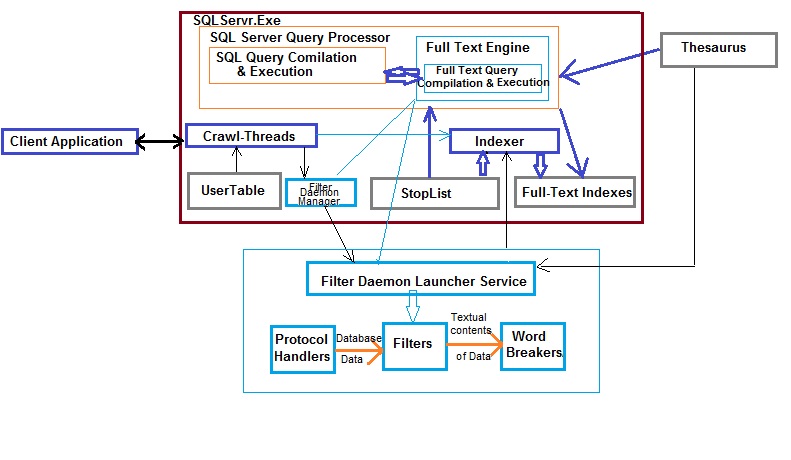
Full-Text Index Architecture


1) Client application submits a query containing Full-Text search contents

2) Query is passed to the SQL server engine comprising of  SQL Server Query Processor and Full-Text Engine along with various other components

3) The Full-Text searches are sent to Full-Text Engine during both the stage Compilation and Execution. SQL Server Query Processor is responsible for parsing, binding, optimization and execution.The Full-Text Engine receives the Full-Text part of the queries from the query processor. It works in conjunction with the SQL server query processor.

4) In order to full the requests a Full-Text engine calls for the Indexer. The indexer is responsible for evaluating the StopList and populating Full-Text Indexes which form a part of the database from SQL server 2008 onwards. Prior to this they were stored separately on file systems. StopList will also contain stopwords which are ignored during query evaluation.

5) Thesaurus is used during Full-Text query compilation and execution. Its external to the SQL server database. This file is also used by the Filer Daemon Launcher Service which is again external to the SQLservr.Exe

6) Filter Daemon Manager is responsible for monitoring the Filer Daemon Launcher Service  or Host Service.Its external to the SQL Server Engine.Inside SQL server engine the user  tables are evaluated during full-text index population or crawl process by the indexer. This  data is also used by the Filter Daemon Manager process which passes this information to  the Host Service.

7) The Filter Daemon Host is responsible for accessing, filtering, and word breaking data from tables, as well as for word breaking and stemming the query input: It comprises of

a) The protocol handler which is responsible for pulling SQL server data from memory and passing the database data to the filter.
b) The filter extracts chunks of data from the input provided by protocol handler. This is dependent on the document type. The embedded formatting is removed by the filter retaining only the textual contents and their position information. This result-set is then passed to the work-breakers. 
c)The word-breakers delimit the result-set. These word-breakers are also passed to the indexer by the Filter Daemon Launcher Service. Just like the stoplist the word-breaker are ignored 


8) During indexing process the indexer uses all of the above result-set    namely 
  • Tokenized daata from full-text crawl threads 
  • Delimited result-set from the Filter Daemon Host Service
  • Stop-list words that are to be excluded 
It then creates index-able words to inverted index fragments. All these fragments are then merged to form the full-text indexes for the tables

9) During the querying process the Full-Text Engine uses the full-text indexes generated by the indexer. The word-breakers and thesaurus are first referenced to generate all forms of query predicate. The query processor then looks-up for all these forms in the full-text indexes. The Full-Text Engine is also responsible for the optimization process much like a standard query optimization process to retrieve the data.

10) The SQL query execution results and Full-Text query execution results are combined and the final result-set is sent across the client.

In the next blog we shall see how to create Full-Text Catalogs,Indexes and how to use full-text index queries.

Tuesday, 15 March 2016

Memory Fundamentals for SQL Server - References


Book References

https://books.google.co.in/books/about/Professional_SQL_Server_2012_Internals_a.html?id=-TjHHnP8ivEC

https://books.google.co.in/books/about/Microsoft_SQL_Server_2008_Internals.html?id=NJUpAQAAMAAJ&redir_esc=y


https://books.google.co.in/books/about/Microsoft_SQL_Server_2012_Internals.html?id=wK1CAwAAQBAJ&redir_esc=y


Topic Wise Blogs


32-bit / 64-bit

http://sqlblog.com/blogs/jonathan_kehayias/archive/2009/07/07/understanding-the-vas-reservation-aka-memtoleave-in-sql-server.aspx

https://msdn.microsoft.com/en-us/library/ms187499(v=sql.105).aspx


/3GB Switch, /PAE Switch, AWE

https://blogs.technet.microsoft.com/beatrice/2008/08/29/3gb-pae-and-awe-taking-away-some-confusion/

http://blogs.technet.com/b/marcelofartura/archive/2006/09/14/3gb-pae-awe-what-basic.aspx

http://blogs.technet.com/b/perfguru/archive/2007/12/05/scenarios-using-3gb-and-pae-switch-and-appropriate-uses-of-these-switches.aspx

https://blogs.msdn.microsoft.com/chadboyd/2007/03/24/pae-and-3gb-and-awe-oh-my/

http://blogs.msdn.com/b/slavao/archive/2005/04/29/413425.aspx

http://blogs.msdn.com/b/slavao/archive/2005/06/03/424905.aspx

http://sqlblog.com/blogs/jonathan_kehayias/archive/2010/10/12/tsql-tuesday-11-misconceptions-enable-awe-on-64bit-sql-servers.aspx

http://sqlblog.com/blogs/jonathan_kehayias/archive/2009/08/24/troubleshooting-the-sql-server-memory-leak-or-understanding-sql-server-memory-usage.aspx

http://sqlblog.com/blogs/jonathan_kehayias/archive/2009/07/07/understanding-the-vas-reservation-aka-memtoleave-in-sql-server.aspx

https://msdn.microsoft.com/en-us/library/ms189334(v=sql.105).aspx

https://msdn.microsoft.com/en-us/library/ms175581(v=sql.105).aspx

https://blogs.msdn.microsoft.com/psssql/2009/09/11/fun-with-locked-pages-awe-task-manager-and-the-working-set/

SQLOS / Processes/ Threads/ CPU Models

http://blogs.msdn.com/b/sqlmeditation/archive/2012/12/13/tasks-worker-threads-scheduler-threads-explain-it-all-and-dmvs.aspx

https://technet.microsoft.com/en-us/library/ms189267(v=sql.105).aspx

https://technet.microsoft.com/en-us/library/ms176043(v=sql.105).aspx

https://technet.microsoft.com/en-us/library/ee210547(v=sql.105).aspx

https://msdn.microsoft.com/en-in/library/ms178074.aspx

https://mssqlwiki.com/2013/01/10/sql-server-operating-system-sos-series-1/

https://blogs.msdn.microsoft.com/sqljourney/2012/12/16/an-in-depth-look-at-sql-server-memorypart-1/

http://www.practicalsqldba.com/2012/07/sql-server-sql-server-scheduler.html


SQL Memory Components

http://blogs.msdn.com/b/slavao/archive/2005/03/18/398651.aspx

http://blogs.msdn.com/b/slavao/archive/2005/08/30/458036.aspx

http://blogs.msdn.com/b/slavao/archive/2005/02/19/376714.aspx

https://msdn.microsoft.com/en-us/library/cc293624.aspx

https://msdn.microsoft.com/en-us/library/ms188754.aspx

https://msdn.microsoft.com/en-us/library/ms176083.aspx


Keep Learning, Keep Exploring, Keep Experimenting 

P.S. (** Not on Production directly **)

Monday, 14 March 2016

Memory Fundamentals for SQL Server - Buffer Pool, Mem To Leave

In the Previous blogs we saw about SQL server logical tree and the various memory caches.

http://sqlandmorewithkruti.blogspot.in/2016/02/memory-fundamentals-for-sql-server-sql.html

In this blog we shall see about Buffer Pool and Mem To Leave a little more in detail.


The Buffer Pool

Buffer Pool comprises of a major component for SQL server memory. It comprises of various chunks of memory spread across User Mode of Virtual Address Space. Apart from the sections mentioned above any temporary memory needed by SQL server to perform hash or sort operations for a given query come from buffer pool. If the existing memory is insufficient SQL server may also use tempdb for the same.

Thread Space Calculation

We know that SQL server executes tasks in terms of threads.
Microsoft suggests the below tables for configuring maximum number of worker threads
https://msdn.microsoft.com/en-us/library/ms190219.aspx


Number of CPUs
32-bit computer
64-bit computer
<= 4 processors
256
512
8 processors
288
576
16 processors
352
704
32 processors
480
960
64 processors
736
1472
128 processors
4224
4480
256 processors
8320
8576

StackSize is the space required to create each thread stack. For each thread On x86 (32-bit) its 0.5MB, on x64 (64-bit) its 2MB, and on IA64 its 4MB.

Determining the Maximum Potential for Non-Buffer Pool Usage based on No. of Threads


This option is the most popular, as the aim is to calculate the worst-case scenario for memory requirements other than SQL Server’s buffer pool. You should allow the following:

➤ 2GB for Windows
➤ xGB for SQL Server worker threads. You can figure out how many threads your instance will configure using Table shown earlier. Each thread will use 0.5MB on x86, 2MB on x64,
and 4MB on Itanium.
➤ 1GB for multi-page allocations, linked servers, and other consumers of memory outside the buffer pool. See the “Reserved Memory, or MemToLeave” section for more details and other consumers.
➤ 1–3GB for other applications that might be running on the system, such as backup programs.

For example, on a server with eight CPU cores and 16GB of RAM running SQL Server 2008 x64 and a third-party backup utility, you would allow the following:

➤ 2GB for Windows
➤ 1GB for worker threads (576 × 2MB rounded down)
➤ 1GB for MPAs, etc.
➤ 1GB for the backup program

The total is 5GB, and you would configure Max Server Memory to 11GB. This is just a rough estimate how memory for the buffer pool can be calculated.

You can view the existing threads within SQL server with the below query.


SELECT * FROM SYS.dm_os_threads


In SQL server terms a buffer is equivalent to a page in memory of size 8KB. A buffer is a page in memory that’s the same size as a data or index page. The main components comprising the data cache and plan cache. You can view the pages in SQL server buffer as follows


You can modify the query further to view the pages allocated per database.


SELECT CASE database_id
WHEN 32767 THEN 'ResourceDb'
ELSE db_name(database_id)
END AS 'Database',page_type,
count(*) as "Page Count",
count(*)*8 AS 'Cached Size (KB)'
FROM sys.dm_os_buffer_descriptors
GROUP BY db_name(database_id) ,database_id, page_type
ORDER BY 'Cached Size (KB)' desc


Hashing

To access these data pages faster SQL server implements a technique called hashing. A hash table is structure in memory pointing to various buffer pages . This is implemented as a linked list with hash tables spanning across multiple hash pages. Given a dbid-fileno-pageno identifier (a combination of the database ID, fi le number, and page number), the hash function converts that key to the hash bucket, any data retrieved by SQL server is from pages within memory. If the page is not available in memory SQL server will fetch the same from the data file to any of the available buffers.
When a read is requested, it gets a list of 64 pages in cache and the server checks whether the free buffer list is below a certain threshold.

BUF array

Bpool needs to maintain information regarding the pages allocated and their types in order to maintain the number of free buffers. It does so using 2 array structures. One stores the pointer to the start of each region in buffer pool. The other stores the count of 8KB pages that are reserved for this region. Each page in the BPool will have a corresponding BUF structure. Each page's BUF structure functions as a type of header for it. Each time a page is referenced, this reference count is incremented. SQL also maintains a free buffer list which contains the count of free pages.


LRU-k Algorithm

The amount of time that pages stay in cache is determined by a least recently used (LRU) policy. The header of each page (BUF structure) in cache stores details about the last two times it was accessed, and a periodic scan through the cache examines these values. A counter is maintained that is decremented if  the page hasn’t been accessed for a while; and when SQL Server needs to free up some cache, the pages with the lowest counter are flushed first.

Commit Bitmap

Pages are first updated in memory only then written onto disk. These include data and log pages. SQL server maintains what is called a Commit Bitmap. As each page in the BPool is committed, its corresponding bit in the commit bitmap is set. The commit bitmap is also set when the reference count decreases as per the LRU-k algorithm. Once a page is dirty and successfully written to disk it is un-hashed and added to the free list. If a page's reference count reaches zero and the page is not dirty, it is simply freed—i.e., moved to the free list without writing anything to disk.


Lazy-writer

Lazywriter is a thread that runs within SQL server. One for each NUMA node. Its task is to scan the BufferPool to ensure enough number of free pages are available in the free buffer list. It also monitors the server memory. If the OS free physical memory drops below 5MB the lazywriter releases memory to the operating system instead of adding it to the free list. If more than 5 MB of physical memory is free, the lazywriter recommits memory to the buffer pool by adding it to the free list.

The lazywriter recommits memory to the buffer pool only when it repopulates the free list; a server at rest does not grow its buffer pool. Lazywriter also ensure that the minimum size of buffer pool is maintained before releasing memory back to operating system. SQL Server uses separate physical structures for a page and its header allows a page to be flushed to disk and to "move" from list to list without anything on the page actually changing. Once a page is written onto the disk and marked as free its contents can be over-written.

CheckPoint

Issuing a checkpoint performs similar functionality like lazywriter of scanning the buffer-pool for flushing out any dirty pages. Difference being it cannot move pages to the free list. Checkpoint can be fired manually to run issuing the CHECKPOINT command. Lazywriter thread wakes up on its own during memory pressure. Also all dirty data pages are written to disk by the checkpoint, not just pages corresponding to committed transactions. The job of the checkpoint is to keep the potential time needed to recover the database to a small value.
Ideally CheckPoint is issued every minute. However this value is set based on the Recovery Interval setting for a database instance.Trace flag 3502 is an undocumented trace flag that records in the error log when a checkpoint starts and stops.


https://msdn.microsoft.com/en-IN/library/ms188748.aspx

You can view the all of the Page Life Expentancy, Checkpoint, Lazywriter setting for a given database instance using perfmon as follows


MeM To Leave


As seen in the above diagram MemToLeave is used for Dll's,COM objects, extended stored procs, linked servers, distributed queries,SQL server code.The size of the MemToLeave region can be adjusted using the -g command line parameter. This may be required when more memory is needed for linked server queries or any other objects residing in MemToLeave region. On the other hand reducing this is not advisable but provides more virtual memory space for Buffer Pool region.

One may view the loaded modules through the below command.


SELECT * FROM SYS.dm_os_loaded_modules


Since MultiPage Allocations are a part of MemToLeave region, 
Allocations needing contiguous memory blocks higher than 8KB come from this region. It could be procedure cache or data pages as well. However not necessary allocations needing lower than 8KB will always end up in buffer pool. It could also be found in MemToLeave region.

As stated earlier SQL server memory is a vast topic to be covered within a few blogs. But as promised I shall provide the references that may be used to study each of these topics in detail in the next blog.