PageViews Last Month

Showing posts with label Memory Management. Show all posts

Tuesday, 15 March 2016

Memory Fundamentals for SQL Server - References


Book References

https://books.google.co.in/books/about/Professional_SQL_Server_2012_Internals_a.html?id=-TjHHnP8ivEC

https://books.google.co.in/books/about/Microsoft_SQL_Server_2008_Internals.html?id=NJUpAQAAMAAJ&redir_esc=y


https://books.google.co.in/books/about/Microsoft_SQL_Server_2012_Internals.html?id=wK1CAwAAQBAJ&redir_esc=y


Topic Wise Blogs


32-bit / 64-bit

http://sqlblog.com/blogs/jonathan_kehayias/archive/2009/07/07/understanding-the-vas-reservation-aka-memtoleave-in-sql-server.aspx

https://msdn.microsoft.com/en-us/library/ms187499(v=sql.105).aspx


/3GB Switch, /PAE Switch, AWE

https://blogs.technet.microsoft.com/beatrice/2008/08/29/3gb-pae-and-awe-taking-away-some-confusion/

http://blogs.technet.com/b/marcelofartura/archive/2006/09/14/3gb-pae-awe-what-basic.aspx

http://blogs.technet.com/b/perfguru/archive/2007/12/05/scenarios-using-3gb-and-pae-switch-and-appropriate-uses-of-these-switches.aspx

https://blogs.msdn.microsoft.com/chadboyd/2007/03/24/pae-and-3gb-and-awe-oh-my/

http://blogs.msdn.com/b/slavao/archive/2005/04/29/413425.aspx

http://blogs.msdn.com/b/slavao/archive/2005/06/03/424905.aspx

http://sqlblog.com/blogs/jonathan_kehayias/archive/2010/10/12/tsql-tuesday-11-misconceptions-enable-awe-on-64bit-sql-servers.aspx

http://sqlblog.com/blogs/jonathan_kehayias/archive/2009/08/24/troubleshooting-the-sql-server-memory-leak-or-understanding-sql-server-memory-usage.aspx

http://sqlblog.com/blogs/jonathan_kehayias/archive/2009/07/07/understanding-the-vas-reservation-aka-memtoleave-in-sql-server.aspx

https://msdn.microsoft.com/en-us/library/ms189334(v=sql.105).aspx

https://msdn.microsoft.com/en-us/library/ms175581(v=sql.105).aspx

https://blogs.msdn.microsoft.com/psssql/2009/09/11/fun-with-locked-pages-awe-task-manager-and-the-working-set/

SQLOS / Processes/ Threads/ CPU Models

http://blogs.msdn.com/b/sqlmeditation/archive/2012/12/13/tasks-worker-threads-scheduler-threads-explain-it-all-and-dmvs.aspx

https://technet.microsoft.com/en-us/library/ms189267(v=sql.105).aspx

https://technet.microsoft.com/en-us/library/ms176043(v=sql.105).aspx

https://technet.microsoft.com/en-us/library/ee210547(v=sql.105).aspx

https://msdn.microsoft.com/en-in/library/ms178074.aspx

https://mssqlwiki.com/2013/01/10/sql-server-operating-system-sos-series-1/

https://blogs.msdn.microsoft.com/sqljourney/2012/12/16/an-in-depth-look-at-sql-server-memorypart-1/

http://www.practicalsqldba.com/2012/07/sql-server-sql-server-scheduler.html


SQL Memory Components

http://blogs.msdn.com/b/slavao/archive/2005/03/18/398651.aspx

http://blogs.msdn.com/b/slavao/archive/2005/08/30/458036.aspx

http://blogs.msdn.com/b/slavao/archive/2005/02/19/376714.aspx

https://msdn.microsoft.com/en-us/library/cc293624.aspx

https://msdn.microsoft.com/en-us/library/ms188754.aspx

https://msdn.microsoft.com/en-us/library/ms176083.aspx


Keep Learning, Keep Exploring, Keep Experimenting 

P.S. (** Not on Production directly **)

Monday, 14 March 2016

Memory Fundamentals for SQL Server - Buffer Pool, Mem To Leave

In the Previous blogs we saw about SQL server logical tree and the various memory caches.

http://sqlandmorewithkruti.blogspot.in/2016/02/memory-fundamentals-for-sql-server-sql.html

In this blog we shall see about Buffer Pool and Mem To Leave a little more in detail.


The Buffer Pool

Buffer Pool comprises of a major component for SQL server memory. It comprises of various chunks of memory spread across User Mode of Virtual Address Space. Apart from the sections mentioned above any temporary memory needed by SQL server to perform hash or sort operations for a given query come from buffer pool. If the existing memory is insufficient SQL server may also use tempdb for the same.

Thread Space Calculation

We know that SQL server executes tasks in terms of threads.
Microsoft suggests the below tables for configuring maximum number of worker threads
https://msdn.microsoft.com/en-us/library/ms190219.aspx


Number of CPUs
32-bit computer
64-bit computer
<= 4 processors
256
512
8 processors
288
576
16 processors
352
704
32 processors
480
960
64 processors
736
1472
128 processors
4224
4480
256 processors
8320
8576

StackSize is the space required to create each thread stack. For each thread On x86 (32-bit) its 0.5MB, on x64 (64-bit) its 2MB, and on IA64 its 4MB.

Determining the Maximum Potential for Non-Buffer Pool Usage based on No. of Threads


This option is the most popular, as the aim is to calculate the worst-case scenario for memory requirements other than SQL Server’s buffer pool. You should allow the following:

➤ 2GB for Windows
➤ xGB for SQL Server worker threads. You can figure out how many threads your instance will configure using Table shown earlier. Each thread will use 0.5MB on x86, 2MB on x64,
and 4MB on Itanium.
➤ 1GB for multi-page allocations, linked servers, and other consumers of memory outside the buffer pool. See the “Reserved Memory, or MemToLeave” section for more details and other consumers.
➤ 1–3GB for other applications that might be running on the system, such as backup programs.

For example, on a server with eight CPU cores and 16GB of RAM running SQL Server 2008 x64 and a third-party backup utility, you would allow the following:

➤ 2GB for Windows
➤ 1GB for worker threads (576 × 2MB rounded down)
➤ 1GB for MPAs, etc.
➤ 1GB for the backup program

The total is 5GB, and you would configure Max Server Memory to 11GB. This is just a rough estimate how memory for the buffer pool can be calculated.

You can view the existing threads within SQL server with the below query.


SELECT * FROM SYS.dm_os_threads


In SQL server terms a buffer is equivalent to a page in memory of size 8KB. A buffer is a page in memory that’s the same size as a data or index page. The main components comprising the data cache and plan cache. You can view the pages in SQL server buffer as follows


You can modify the query further to view the pages allocated per database.


SELECT CASE database_id
WHEN 32767 THEN 'ResourceDb'
ELSE db_name(database_id)
END AS 'Database',page_type,
count(*) as "Page Count",
count(*)*8 AS 'Cached Size (KB)'
FROM sys.dm_os_buffer_descriptors
GROUP BY db_name(database_id) ,database_id, page_type
ORDER BY 'Cached Size (KB)' desc


Hashing

To access these data pages faster SQL server implements a technique called hashing. A hash table is structure in memory pointing to various buffer pages . This is implemented as a linked list with hash tables spanning across multiple hash pages. Given a dbid-fileno-pageno identifier (a combination of the database ID, fi le number, and page number), the hash function converts that key to the hash bucket, any data retrieved by SQL server is from pages within memory. If the page is not available in memory SQL server will fetch the same from the data file to any of the available buffers.
When a read is requested, it gets a list of 64 pages in cache and the server checks whether the free buffer list is below a certain threshold.

BUF array

Bpool needs to maintain information regarding the pages allocated and their types in order to maintain the number of free buffers. It does so using 2 array structures. One stores the pointer to the start of each region in buffer pool. The other stores the count of 8KB pages that are reserved for this region. Each page in the BPool will have a corresponding BUF structure. Each page's BUF structure functions as a type of header for it. Each time a page is referenced, this reference count is incremented. SQL also maintains a free buffer list which contains the count of free pages.


LRU-k Algorithm

The amount of time that pages stay in cache is determined by a least recently used (LRU) policy. The header of each page (BUF structure) in cache stores details about the last two times it was accessed, and a periodic scan through the cache examines these values. A counter is maintained that is decremented if  the page hasn’t been accessed for a while; and when SQL Server needs to free up some cache, the pages with the lowest counter are flushed first.

Commit Bitmap

Pages are first updated in memory only then written onto disk. These include data and log pages. SQL server maintains what is called a Commit Bitmap. As each page in the BPool is committed, its corresponding bit in the commit bitmap is set. The commit bitmap is also set when the reference count decreases as per the LRU-k algorithm. Once a page is dirty and successfully written to disk it is un-hashed and added to the free list. If a page's reference count reaches zero and the page is not dirty, it is simply freed—i.e., moved to the free list without writing anything to disk.


Lazy-writer

Lazywriter is a thread that runs within SQL server. One for each NUMA node. Its task is to scan the BufferPool to ensure enough number of free pages are available in the free buffer list. It also monitors the server memory. If the OS free physical memory drops below 5MB the lazywriter releases memory to the operating system instead of adding it to the free list. If more than 5 MB of physical memory is free, the lazywriter recommits memory to the buffer pool by adding it to the free list.

The lazywriter recommits memory to the buffer pool only when it repopulates the free list; a server at rest does not grow its buffer pool. Lazywriter also ensure that the minimum size of buffer pool is maintained before releasing memory back to operating system. SQL Server uses separate physical structures for a page and its header allows a page to be flushed to disk and to "move" from list to list without anything on the page actually changing. Once a page is written onto the disk and marked as free its contents can be over-written.

CheckPoint

Issuing a checkpoint performs similar functionality like lazywriter of scanning the buffer-pool for flushing out any dirty pages. Difference being it cannot move pages to the free list. Checkpoint can be fired manually to run issuing the CHECKPOINT command. Lazywriter thread wakes up on its own during memory pressure. Also all dirty data pages are written to disk by the checkpoint, not just pages corresponding to committed transactions. The job of the checkpoint is to keep the potential time needed to recover the database to a small value.
Ideally CheckPoint is issued every minute. However this value is set based on the Recovery Interval setting for a database instance.Trace flag 3502 is an undocumented trace flag that records in the error log when a checkpoint starts and stops.


https://msdn.microsoft.com/en-IN/library/ms188748.aspx

You can view the all of the Page Life Expentancy, Checkpoint, Lazywriter setting for a given database instance using perfmon as follows


MeM To Leave


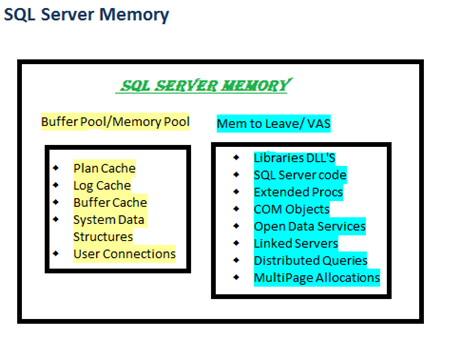
As seen in the above diagram MemToLeave is used for Dll's,COM objects, extended stored procs, linked servers, distributed queries,SQL server code.The size of the MemToLeave region can be adjusted using the -g command line parameter. This may be required when more memory is needed for linked server queries or any other objects residing in MemToLeave region. On the other hand reducing this is not advisable but provides more virtual memory space for Buffer Pool region.

One may view the loaded modules through the below command.


SELECT * FROM SYS.dm_os_loaded_modules


Since MultiPage Allocations are a part of MemToLeave region, 
Allocations needing contiguous memory blocks higher than 8KB come from this region. It could be procedure cache or data pages as well. However not necessary allocations needing lower than 8KB will always end up in buffer pool. It could also be found in MemToLeave region.

As stated earlier SQL server memory is a vast topic to be covered within a few blogs. But as promised I shall provide the references that may be used to study each of these topics in detail in the next blog.

Monday, 22 February 2016

Memory Fundamentals for SQL Server - SQL Server Memory Components, SQL Server Memory Logical Tree


In the Previous blogs we have seen about virtual memory related concepts.
http://sqlandmorewithkruti.blogspot.in/2016/01/memory-fundamentals-for-sql-server.html


We came across concepts like Address Window Extension, Physical Address Extension.

We also saw the various CPU related architectural concepts and briefly touch based SQLOS.

In this blog we shall see how SQL server memory is divided.


When SQL server starts memory is first reserved for the MEM To Leave area also known as Virtual Address Space Reservation area. This is not user configurable. Windows Memory Management allows user process to reserve a contiguous block of address space without actually consuming committed pages. This is called VAS reservation or MEM to Leave. Components of the Mem To Leave area are mentioned above. All allocations for a contiguous memory block larger than 8KB come from the MemToLeave region. it's possible that allocations smaller than 8KB could end up coming from the MemToLeave region.
The default size of Mem To Leave region is 256MB but can be changed using the -g parameter during SQL server startup.

Next comes the BUFFER Pool

Calculation of BufferPool Region

We have the maximum server memory option for any SQL server instance. This option decides the amount of memory that will be allocated for the Buffer Pool region. Bpool consists of 32 separate memory regions organized into 8KB pages.


In 32-Bit Systems

Once the MemToLeave region is occupied the remaining Virtual Address Space is checked. The remainder of the VAS is calculated and reserved for SQL server. If this value is less than Max Server Configuration then that becomes the size of the Buffer Pool.


The calculation of the Buffer Pool size however differs if the AWE is enabled and /PAE switch is used. Here the physcial memory on the server or the max server memory configuration setting, whichever is smaller becomes the size of the Buffer Pool.

In 64-Bit Systems

There is no need to use AWE to allocate memory above 3GB for SQL Server since the user mode VAS is 8TB there is always ample VAS to utilize all of the physical memory available on the server.


For 64 bit servers, the maximum size of the BPool is the size of physical memory or the max server memory configuration, whichever is smaller. For example, a 64 bit server with 16GB RAM, and a default max server memory configuration, the maximum size of the Bpool would be 16GB.


SQL server memory logical level tree


The SQL Server memory manager has a three-level structure. At the bottom are memory nodes which are the lowest level allocators for SQL Server memory, the second level consists of memory clerks which are used to access the memory nodes and cache stores which are used for caching. The top layer contains memory objects which provide a smaller level of granularity than the memory clerks allow directly. 


Memory Nodes
As described in the previous blog it’s a logical unit in which SQL server access memory.


Memory Clerks

Memory clerks access memory nodes to allocate memory to different objects. Information on different types of memory clerks is listed using the below query. Till SQL server version 2008 you will be able to see the segregation of the single pages allocated and multiple pages allocated for particular objects.

select distinct type from sys.dm_os_memory_clerks where type like 'mem%' order by type.

Memory Caches

SQL Server uses three types of caching mechanism: object store, cache store, and user store.

Object Store :

Object stores are used to cache homogeneous types of stateless data. Each entry within this store can be used by only one client at a time. SQLOS does not control the lifetime of the entries in the object store type of cache. Hence it does not implement Least Recently Used (LRU) Algorithm for costing the entries and maintaining their lifetime. One example for use of an object store is the SNI, which uses the object store for pooling network buffers. No state, no cost , all buffers of the same size.

User Store:

User stores are used for objects that has its own storage user's mechanism. How the objects are stored depends on the underlying development framework. SQLOS controls the lifetime of entries and maintains a cost based on LRU algorithm. One example of User Store objects is metadata cache.

Cache Store:

For cache store the lifetime is fully controlled by SQLOS's caching framework. The storage mechanism is SQL OS managed. SQLOS does this with what is called the hashing technique wherein the entry for each object is stored in one or multiple tables. This supports for faster look-ups. SQLOS controls the lifetime of entries and maintains a cost based on LRU algorithm. Object Plans (CACHESTORE_OBJCP), SQL Plans (CACHESTORE_SQLCP), Bound Trees (CACHESTORE_PHDR), Extended Stored Procedures (CACHESTORE_XPROC) all fall within this cache store.

I recommend you go through the below blogs to study further.

http://blogs.msdn.com/b/slavao/archive/2005/03/18/398651.aspx
http://blogs.msdn.com/b/slavao/archive/2005/08/30/458036.aspx
http://blogs.msdn.com/b/slavao/archive/2005/02/19/376714.aspx
https://msdn.microsoft.com/en-us/library/cc293624.aspx

Thus SQL server memory gets divided into various stores. On the whole MemToLeave and BufferPool is what comprises the SQL server memory. In the next blog we shall see how SQL server responds to memory pressure. How the memory caches are accounted for based on LRU & hashing algorithms.


Tuesday, 9 February 2016

Memory Fundamentals for SQL Server - Process-Thread Model, CPU execution model, CPU scheduling, CPU Architechture, SQLOS

Until now we have seen the windows memory addressing concepts.

http://sqlandmorewithkruti.blogspot.in/2016/02/memory-fundamentals-for-sql-server-awe.html

So how exactly are user applications like SQL server assigned to this space. To understand this we need to see how the application is broken in terms of processes and threads.


Process


A process is an instance of a running program on Windows. A process can have one or more threads .Each process consists of 2 components process kernel object and virtual address space.The virtual address space contains all the code and data. However the executable code and data isn't loaded until required by the operating system in page-sized chunks (4K for Win32 on x86). Every executable or DLL file mapped into a process's address space is assigned a unique instance handle. SQL Server is a process that can run as either a service or a console mode application

Threads


Threads are unit of execution of a process. Without threads application processes are incapable of carrying out any task on the system. By virtue of Windows' process separation, a thread can't access the address space of other processes without a shared memory section. Once a process is created, the system automatically creates its first thread called primary or main thread. When this thread is killed or exits the process ends.

Quantum

Amount of time a thread is allowed to execute on the processor. When the Quantum is reached or until a higher priority thread interrupts the thread is interrupted and another thread is allowed to run on the processor. This movement of thread out of processor is called Yielding.


Context Switching

When a new thread is selected to run on a processor if the existing thread is interrupted or if the quantum is met some piece of information is saved and loaded next time the thread is back on the CPU for execution. This information consists of data in the volatile registers and other program counters. This process of saving clearing and loading data between thread switching is called context switching.

Thread States

A thread can exists in any of the below states
0 Initialized
1 Ready— waiting on a processor
2 Running— currently using a processor
3 Standby— about to use a processor
4 Terminated— has been stopped
5 Wait— waiting on a peripheral operation or a resource
6 Transition— waiting for resource in order to execute
7 Unknown

Windows allows threads to be suspended and resumed based on Windows API's. If a thread suspends itself for a specified period of time its called a sleeping thread. Else a suspended thread cannot explicitly resume itself until intervened by another thread.

Thread priorities

Windows allocates priorities to thread which govern their behaviour for yielding and context switching.Threads begin life inheriting the base priority of their process. This priority can be set when the process is first created.

Fibers

Fibers are a user-space construct. Its execution is not managed by kernel like threads but they follow. Cooperative scheduling Windows fibers have less overhead associated with them than threads do. One may also call them lightweight threads.Certain components of SQL Server don’t work, or don’t work well, when SQL Server runs in fiber mode. These components include SQLMail and SQLXML. Other components, such as heterogeneous and CLR queries, are not supported at all in fiber mode because they need certain thread-specific facilities provided by Windows.

CPU Execution Models


Single Thread Execution Model

Here one thread is executed as the name suggest per CPU processor.


Multi/Hyper-Threaded Execution Model

Here multiple threads are executed as the name suggest per CPU processor.


CPU Scheduling


CPU scheduling decisions take place under one of four conditions:
  1. When a process switches from the running state to the waiting state, such as for an I/O request or invocation of the wait( ) system call. 
  2. When a process switches from the running state to the ready state, for example in response to an interrupt. 
  3. When a process switches from the waiting state to the ready state, say at completion of I/O or a return from wait( ). 
  4. When a process terminates. 
For conditions 1 and 4 there is no choice - A new process must be selected.
For conditions 2 and 3 there is a choice - To either continue running the current process, or select a different one.
If scheduling takes place only under conditions 1 and 4, the system is said to be non-preemptive, or cooperative. Under these conditions, once a process starts running it keeps running, until it either voluntarily blocks or until it finishes. With non-preemptive scheduling, the code that’s being run is written to yield control at key points. At these yield points, the scheduler can determine whether a different task should be run.Otherwise the system is said to be preemptive. Operating system can interrupt the thread execution any time in preemptive scheduling.


CPU Architecture


This refers to how memory is connected with the CPU's It can be either of the following

Symmetric Multiprocessing 

In a symmetric multiprocessing (SMP) architecture, all processors are connected to all of the memory through a shared system bus. Performance is limited by the bus bandwidth.


NonUniform Memory Access

A non-uniform memory access (NUMA) architecture refers to a system where there the total available memory is broken down into multiple nodes. A group of processors are also connected directly to each of these nodes. If a processor is accessing memory on the same node at which it is located its accessing "local" memory pool. If the processor is accessing memory from a different node its accessing remote or non-local memory. Thus it reduces in cost of using shared memory bus but there comes additional higher cost of accessing remote memory.


In a SQL Server environment, one of the optimizations that SQL Server can choose is to use parallelization in a query plan. If the available processors are hyper-threaded, then they are not really separate processors; and because each thread in a parallel plan needs to update its status to a single set of data structures, on a system with Hyper-Threading enabled, a parallel plan can see a severe performance degradation.


SQLOS

SQLOS is a thin layer that sits between SQL Server and Windows. It is responsible for scheduling, I/O completion, memory management and resource management. A question may arise when windows already has its own memory management unit why is there a need for another user-mode layer. Reasons being


  • Optimizing the way threads are chosen in terms of priority to be executed by schedulers
  • Greater flexibility and control on underlying architecture.
  • To avoid Context Switching
  • Provision of extended diagnostic capabilities such as DAC and DMVs for better troubleshooting.
  • Optimization of Windows performance when running SQL server.

Tasks

Any work assigned for SQL server to be carried out or executed is called a task. They are different from SQL server SPID's. A SPID is merely a connection or channel over which requests can be sent. Not necessary an SPID might have any active task assigned. A batch can map to one or more tasks. Tasks are further broken down to Workers. Similar to a process being broken down to threads.

Worker

UMS worker encapsulates a thread or fiber & carries out the tasks within the SQL server. On receiving any new tasks a worker gets assigned to the tasks and is not released till the completion or termination of the task. If any of the worker is free from the pool it gets assigned to the new tasks. Else if the max worker threads value has not been reached, SQL Server will create and allocate a new worker. When the server is in thread mode and a worker has been idle for 15 minutes, SQL Server destroys it, provided doing so will not reduce the number of workers below a predefined threshold.


The Scheduler

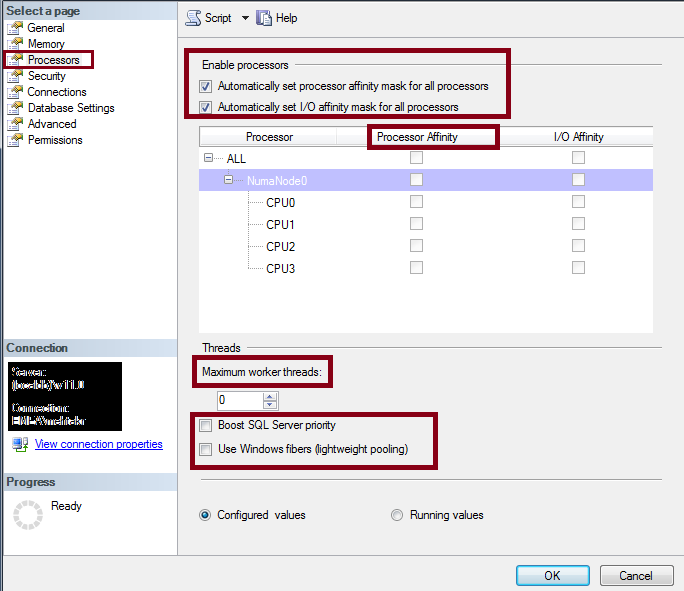
When SQL server starts one scheduler is created for each processor on the system. So why do we have the option for processor affinity mask. Each scheduler is set to either ONLINE or OFFLINE based on this option. By default this is automatically configured and all the schedulers are supposed to be online. These schedulers picks up workers from the worker pool for execution. The workers are evenly distributed.

CPU Node

This is a logical unit within SQLOS where in which CPU's are grouped. On an SMP system, all CPUs would be grouped under a single CPU node, whereas on a NUMA-based system, there would be as many CPU nodes as the system supported.

Memory Node

This is a logical unit within SQLOS where in which memory access. There is a memory node for each set of CPUs to localize memory. On an SMP architecture, a memory node shares memory across all CPUs, whereas on a NUMA architecture, a memory node per NUMA node exists. Memory nodes share the memory allocated by Max Server Memory.


SQLOS options in SQL server


Connections, SPID's , Workers

When SQL server receives a new connection request an SPID is assigned. Next the scheduler gets assigned to the SPID . The connection is run on the least loaded scheduler on that node. Until SQL server 2008 the connection was scheduler bound. When subsequent requests are sent from the same SPID, if another scheduler has a load factor that is less than a certain percentage it gets assigned to the new worker for the same SPID.

So how exactly SQLOS puts up with the OS preemptive scheduling.

Each thread under SQLOS has an associated event object. If a thread is in wait state Windows will not consider it for scheduling. SQLOS puts workers(threads/fibers) to sleep until it wants it to be scheduled by making a call to WaitForSingleObject on their corresponding event object. It passes INFINITE as the parameter for the timeout value.

When it should be scheduled SQLOS the object associated with the worker will be signaled. This allows the worker thread to come out of its wait state and windows scheduler will now be able to place the thread based on scheduling to on of the processors. SQLOS relies on the fact that the workers, (threads or fibers) to yield voluntarily often enough so one process or thread doesn’t have exclusive control of the system. However it still adheres to a concept of a quantum. Instead of SQL Server tasks being forced to give up the CPU by the operating system, SQL Server tasks can request to be put on a wait queue periodically, and if they have exceeded the internally defined quantum, and they are not in the middle of an operation that cannot be stopped, they will voluntarily relinquish the CPU.

SQLOS as such is a vast topic to be covered under one post but the above gives a fair idea of its functionality and advantages. Below are a few links for the same.

http://blogs.msdn.com/b/sqlmeditation/archive/2012/12/13/tasks-worker-threads-scheduler-threads-explain-it-all-and-dmvs.aspx
https://technet.microsoft.com/en-us/library/ms189267(v=sql.105).aspx
https://blogs.msdn.microsoft.com/sqljourney/2012/12/16/an-in-depth-look-at-sql-server-memorypart-1/

In the next blogs we shall see the segregation of memory in terms of SQL server